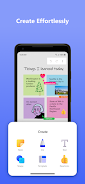
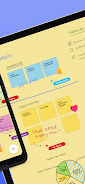
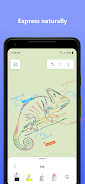
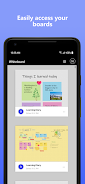
Microsoft Whiteboard is a freeform, intelligent canvas for individuals and teams who need a flexible place to sketch, plan, and collaborate visually. The app supports touch, pen, and typed input so you can draw or write naturally, add sticky notes and notes grids, insert text, and use a shapes library or templates to speed up sessions. Real-time coauthoring lets teammates edit the same board from different devices while automatic cloud saving keeps work available whenever and wherever you return.
Key Features
Microsoft Whiteboard provides an infinite, touch-first canvas with intelligent inking that converts doodles into clean shapes and lines.
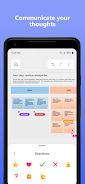
Real-time collaboration shows what teammates are doing and lets multiple users edit the same canvas simultaneously.
A library of pre-built templates and shapes helps you start quickly and structure brainstorming or flowcharts.
You can add sticky notes, notes grids, typed text, and lightweight reactions to capture ideas and give quick feedback.
Automatic cloud saving preserves your boards so you can resume work across devices without exporting.
Facilitation tools include copy/paste, object alignment and snapping, background formatting, ink arrows, and creative ink effect pens such as rainbow and galaxy.
Advantages
The intuitive interface of Microsoft Whiteboard is designed for touch, pen, and keyboard input to make sketching or typing ideas straightforward. Its collaboration features let distributed teams co-edit boards in real time, keeping everyone on the same page. A wide selection of templates and expressive inking options speed up workshops, lessons, and design sessions. Cloud synchronization and automatic saves protect your work and let you pick up where you left off on another device.
Disadvantages
Signing in with a Microsoft account is required to access boards and cloud features. The best experience is on touch- or pen-enabled devices; complex boards on small screens can feel cramped. An internet connection is necessary for real-time collaboration and cloud sync, so offline use is limited.
Version Information
This update adds support for personal Microsoft accounts and introduces a refreshed look with a streamlined UI and a new creation gallery for finding objects and features. Interactive content improvements include more than 40 customizable templates and lightweight reactions. Facilitation and productivity enhancements added copy/paste, object alignment and snapping, and background formatting. Inking capabilities were expanded with ink arrows and creative ink effect pens.